
H1 is the clearest signal of what a page is about—for users, search engines, and assistive technologies. Yet many sites misuse or ignore it, leaving relevance, accessibility, and clicks on the table. This guide explains what an H1 tag is, why it matters, how to write and implement H1s across CMSs and modern frameworks, how to audit and fix issues at scale, and how to measure real impact with data-backed methods.
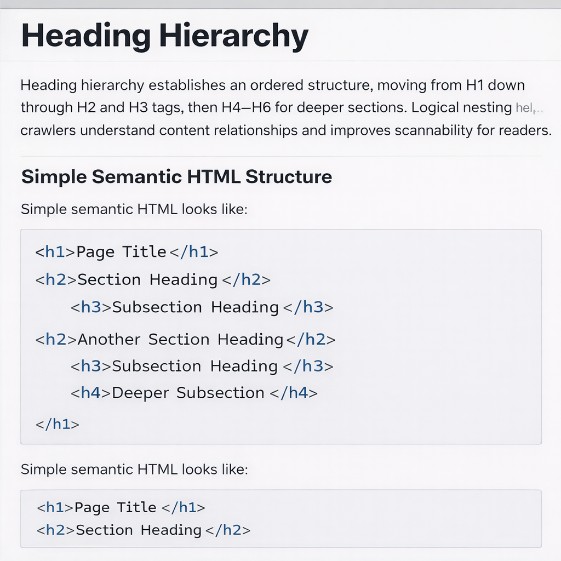
What Is an H1 Tag? Definition, Hierarchy, and Google's Stance
Clear structure helps both users and crawlers understand page focus, and the H1 sits at the top of that structure.
Definition and heading hierarchy (H1–H6)
The H1 is the main on-page heading that labels the primary topic of a document. HTML heading tags (H1–H6) create a logical outline for humans and machines, forming a content structure and hierarchy that guides reading and indexing. An H1 provides a strong topical anchor, while H2–H6 break content into subsections and details. Proper heading hierarchy improves on-page SEO by clarifying intent, reducing ambiguity, and supporting scannability. Strong H1 tag examples emphasize specificity and relevance. Placement near the start of the main content sets expectations early and helps search engines interpret page focus. Misuse of headings—such as styling divs to look like headings—erodes semantic value and complicates accessibility for screen readers.
HTML5 and multiple H1s: Google's stance
HTML5 permits multiple H1 elements under distinct sectioning roots, and Google representatives confirm that multiple H1s do not inherently hurt rankings. Meaningful structure matters more than counting. A single H1 per page often improves user experience (UX) and maintainability because it reduces confusion and template-level errors. Pages benefit from a prominent, visible H1 that summarizes the core topic and aligns with query intent. Practical guidance favors one clear, visible H1 within the main content area, supported by H2–H6 for subsections. Decorative or navigational text should not use H1 markup.
Semantic and accessible structure
Semantic markup communicates roles to browsers and assistive technologies. Screen reader users rely on heading hierarchy to navigate quickly and jump between sections. A distinct H1 inside the main landmark improves orientation and compliance. Logical order—H1 followed by H2s, then H3s—supports predictable navigation and better reading flow. Accessibility for screen readers depends on visible headings with adequate contrast and no CSS tricks that hide or shrink the H1. ARIA roles alone should not replace semantic HTML headings; they augment semantics rather than substitute them.
Why H1 Tags Matter for SEO, UX, and Accessibility
Strong H1s reinforce relevance, improve first impressions, and open access for all users.
SEO benefits: relevance and discoverability
H1s contribute to relevance by signaling page focus to search engines. Clear phrasing aligns on-page signals with query intent, helping crawlers resolve topical context and supporting better indexing. Consistency between the H1, title tag, intro paragraph, and subheadings strengthens topical authority and reduces ambiguity. Title tag optimization paired with a descriptive H1 can lift click-through rates when searchers see matching intent in SERPs and on the page. Include the target keyword naturally near the start and avoid keyword stuffing.
UX impact: scannability and retention
Users scan pages. A clear H1 confirms the topic immediately and reduces pogo-sticking. Concise language, no jargon, and a direct promise of value improve engagement. Headings support a clean content structure so readers can skim and find sections fast. UX gains often appear in reduced bounce rates, improved scroll depth, and higher conversion rates.
Accessibility: screen readers and landmarks
Screen readers depend on headings to navigate. A clear H1 inside the main landmark provides orientation, while H2–H6 enable section skipping. Hidden or decorative H1s create barriers and compliance risks. Audits using Lighthouse or axe confirm heading order, visibility, and contrast.
When H1s won't fix ranking issues
H1 optimization supports discoverability but cannot fix deeper problems. Thin content, poor internal linking, slow rendering, and weak backlinks limit performance. H1s are effective within a broader SEO strategy including technical health, schema, navigation, and content depth.
Best Practices: Writing H1s That Align With Search Intent
Effective H1s start with intent, then apply clarity, brevity, and semantic structure.
Intent alignment and keyword placement
Align wording with search intent: informational queries need explanations; transactional queries highlight products/solutions. Include the target keyword naturally, preferably near the start. Human readability takes priority. Secondary modifiers can refine scope—year, model, size, or audience—while staying concise.
Length and formatting guidelines
Clarity beats strict counts. One concise sentence (~30–70 characters) often works well. Use consistent title or sentence case. Avoid all caps, emojis, and decorative symbols. Place H1 near top of main content with adequate font size and contrast.
H1 vs title tag: match or differentiate?
The title tag appears in SERPs and browser tabs; the H1 is the on-page main heading. They can match or differ slightly; keep them thematically aligned. Differentiation is fine when a clickable title needs curiosity while H1 prioritizes clarity.
Examples by page type
Blog: "Beginner's Guide to Cold Brew Coffee at Home"
Product: "Acme X200 Electric Scooter – 25 Mile Range"
Category: "Men's Trail Running Shoes – Lightweight & Durable"
Landing: "Business Expense Management Software That Teams Love"
News: "City Council Approves New Green Transit Plan"
Anti-patterns to avoid
Keyword stuffing, all caps, emojis, hidden H1s, logos as H1s, navigation headers as main H1s, and non-semantic markup degrade UX and SEO.
How to Implement H1s in CMSs and Modern Frameworks
Implementation varies by platform, but aim for one visible, semantic H1 in main content.
WordPress and Shopify (themes, templates, blocks)
Verify post/page titles map to a single H1 in the main. Avoid duplicate H1s from blocks or headers. Use CMS validations and template conventions.
Webflow, Wix, and Squarespace steps
Use H1 for the main topic, reserve H2–H6 for subsections. Avoid duplicates in headers/hero blocks. Verify post-publish via view source or exported pages.
React/Next.js/Nuxt: SSR/SSG and semantic components
export default function ProductPage({ product }) {
return (
      {product.name} – {product.keyAttribute}          Specifications      );
}
Headless CMS modeling and validation
Model a dedicated H1 field, validate required entries, uniqueness, and length. Map templates to render H1 in the main content. Enforce localized H1s for international sites.
Accessibility and QA checks
Ensure H1 is visible, semantic, and logically ordered. Use Lighthouse, axe, screen readers, and DevTools. Automated CI tests catch multiple H1s or non-semantic substitutions.
Auditing and Fixing H1s at Scale
Crawl data reveals systemic issues; template fixes deliver durable improvements.
Crawling and extracting H1s (rendered HTML)
Tools like Screaming Frog, Sitebulb, or Semrush extract H1s from rendered HTML to verify what users and bots see. Segment by page type to identify patterns.
Identify issues: missing, duplicate, multiple, hidden
Flag missing or duplicate H1s, multiple H1s in main content, hidden H1s, and non-semantic markup. Check CSS properties like visibility: hidden or font-size.
Template-level fixes and governance
Render one H1 in the main, remove decorative H1s, convert divs to semantic headings. Use CMS validations, CI tests, and editor documentation.
Prioritization and rollout plan
Focus on high-traffic templates. Deploy fixes in phases, monitor GSC for CTR and position changes. Document changes and track performance.
Measuring Impact: KPIs, Testing, and Evidence
Tracking H1 effectiveness combines SEO metrics with UX data. Google Search Console reports impressions, clicks, CTR, and average position, while analytics tracks scroll depth, bounce rates, and conversions.
Testing methods include template-level A/B experiments or phased rollouts. Align H1 adjustments with query intent to observe measurable changes in CTR and dwell time. Multiple H1s alone rarely harm results if the heading structure remains clear.
For global sites, localize H1s per locale, respecting grammar, casing, and hreflang mapping. Post-indexing evaluation should span 2–4 weeks. Document learnings, iterate on high-performing templates, and maintain a changelog for continuous optimization.
Conclusion
Clear, visible H1s establish page focus, support accessibility, and align with search intent.
Correct implementation across CMSs and frameworks prevents duplicate or missing H1 tags.
Measurement with GSC and analytics validates impact; testing reduces guesswork.
Next step: download the H1 audit checklist, run a site crawl, and schedule a review to prioritize fixes.
FAQS
Is the H1 tag important for SEO?
Yes—H1s clarify page focus for users and search engines, supporting relevance, UX, and accessibility. Strong H1s can lift CTR and engagement.
Can a page have multiple H1 tags?
HTML5 allows it and Google can handle multiple H1s. Practically, one clear H1 per page is best; ensure meaningful structure if multiples exist.
How long should an H1 tag be?
Aim for one concise, descriptive sentence—often ~30–70 characters. Prioritize clarity and intent alignment over character counts.
Should the H1 include my target keyword?
Include the primary keyword naturally, preferably near the start. Don't stuff keywords—write for humans and reflect the search intent.
What's the difference between the H1 and the title tag?
The title tag appears in SERPs and browser tabs; the H1 is the on-page main heading. They can match or differ slightly; keep them thematically aligned.