
A few toxic links can silently tank rankings—and fixing them is much easier with the right workflow. The real challenge isn't effort; it's judgment. Many domains carry a mix of benign mentions, old citations, and truly manipulative links. Which ones matter? Acting on the wrong signals wastes time, while missing real risks invites volatility or a manual action penalty.
This playbook shows how to remove bad backlinks safely and efficiently. Expect a step-by-step process that distinguishes harmless noise from threats, assigns a risk score, executes removal or disavow choices, and tracks recovery with concrete metrics.
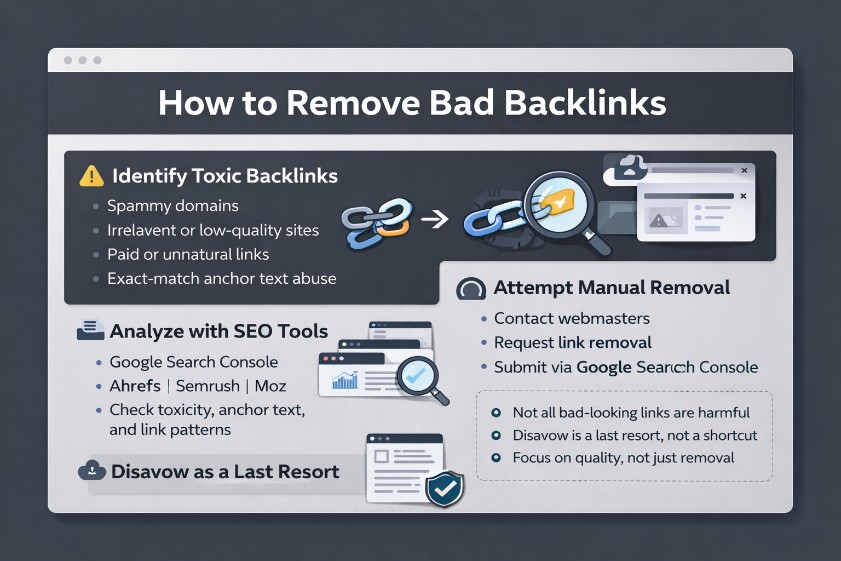
What Counts as a Bad Backlink and When Should You Act?
Definitions & real risks: bad vs toxic links
Not every low-quality link is dangerous. "Bad" often means irrelevant or low-value; "toxic" implies clear manipulation or risk signals. Toxic backlinks commonly include private blog networks (PBNs), spam directories, mass blog comment links, forum links injected by bots, and paid/sponsored placements without rel="sponsored" or rel="nofollow". Sitewide footer credits across hundreds of pages, hacked/injected links, and press release links syndicated across weak domains also sit in the danger zone.
By contrast, small blogs with editorial context, legitimate directory links in niche verticals, or nofollow citations usually pose minimal risk. The line is manipulation: patterns that look like link schemes, over-optimized anchor text on money pages, and sitewide links out of context. The more automated and irrelevant the pattern, the higher the risk score should trend.
When to act: manual actions vs algorithmic risk
Timing matters. Google's guidance is clear: the disavow feature is primarily for manual action scenarios or for obvious link spam that can't be removed. When Google applies a manual action for "unnatural links," Search Console will display it explicitly. That's a red alert requiring immediate outreach and a targeted disavow.
Algorithmic risk is subtler. Watch for sudden spikes in exact-match anchors, language or geo mismatches (e.g., hundreds of foreign sites overnight), non-indexed domains linking in bulk, or velocity surges after a campaign. Anchor manipulation—especially over-optimized anchor text pointing to commercial pages—should trigger review. If the footprint suggests link schemes or low-trust sources, act before it escalates into a manual action penalty.
Prerequisites & setup: access, policies, evidence
A smooth cleanup relies on preparation: - Access: Google Search Console, plus Ahrefs, Semrush, or Majestic for deeper data. - Assets: a tracking spreadsheet or lightweight CRM, a documentation folder with evidence (screenshots of injected links, outreach logs), and a working understanding of Google's link spam policy. - Process: outreach templates, a disavow file naming convention, and a change log.
Avoid common mistakes. Over-disavowing healthy links, treating nofollow as harmful, ignoring legacy redirects that pass bad equity, or paying for removals can backfire. Map business model risks, too. Affiliate/ecommerce teams often inherit syndicated press release links and coupon sites; B2B firms accumulate partner sitewide credits; local businesses attract low-quality citation spam. Calibrate thresholds accordingly.
With definitions and triggers set, the next step is disciplined analysis. A risk-scoring audit turns guesswork into confident decisions.
Audit & Prioritize: A Risk-Scoring Framework for Toxic Links
Collect & dedupe data (GSC + Ahrefs/Semrush/Majestic)
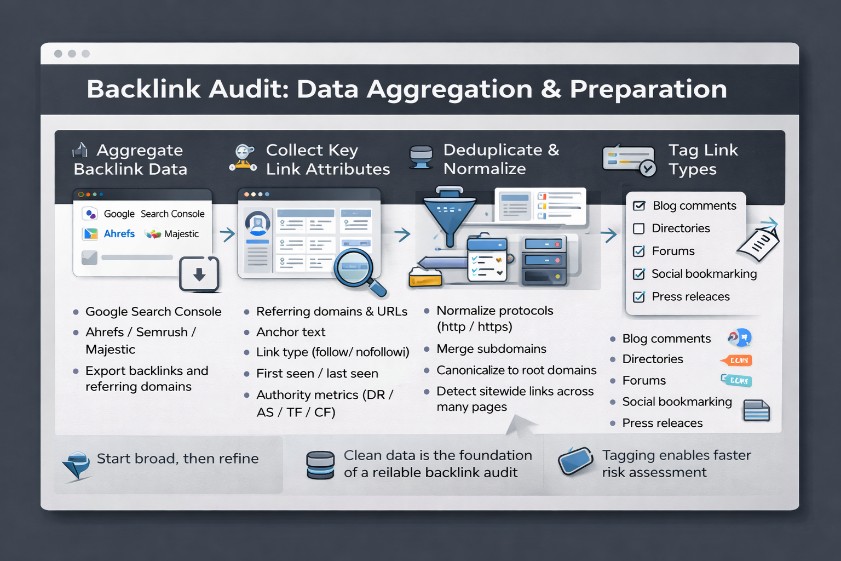
Start broad, then refine. Aggregate backlinks from Google Search Console and a third-party toolset such as Ahrefs, Semrush, or Majestic. Export referring domains and URLs, anchors, link types, first/last seen, authority metrics (DR/AS/TF/CF), traffic estimates, and indexation status.
Deduplicate carefully. Normalize protocols and subdomains, canonicalize to root domains, and flag sitewide links that appear across hundreds of pages. Enrich the dataset with language, geo, topical category, and crawl status of linking pages. Tag link types: blog comment links, directory links, forum links, social bookmarking links, press release links, and footer/sidebar placements. This sets the stage for a clean, reliable backlink audit.
Risk scoring model: signals, weights, thresholds
A weighted model reduces bias. Score each referring domain on key signals and apply cutoffs to focus effort: - Relevance (30%): topical alignment of the linking site and page. - Anchor manipulation (20%): exact-match money anchors or unnatural density. - Authority/traffic (15%): low authority with zero/near-zero traffic increases risk. - Placement/type (20%): sitewide links, sidebars, or templated footers score higher. - Indexation (10%): non-indexed linking pages or deindexed domains are red flags. - Language/geo (5%): major mismatch without business rationale.
Set thresholds: high risk ≥70, medium 40–69, low<40. Signals include PBN footprints (same IP/CMS themes, thin content), obvious spam backlinks, foreign-language bursts, and links from non-indexed pages. Use filters to isolate over-optimized anchor text and sudden velocity spikes. The outcome is a prioritized queue that points resources where they matter most.
Decision matrix & mini case example
Turn scores into actions with a simple matrix: - High risk (≥70): attempt removal via outreach if reachable; otherwise prepare a domain-level entry in the disavow file. - Medium (40–69): where relationships exist (partners/sponsors), request rel="nofollow/sponsored" rather than removal. For ambiguous cases, isolate URL-level disavow entries. - Low (<40): monitor. Avoid blanket disavows; many are benign.
Operational assets help: a 100-point scoring spreadsheet with formulas, anchor distribution charts, and filters for sitewide flags. In one cleanup, 1,200 referring domains were reviewed: 85 high-risk (PBNs and press syndication), 210 medium (partner footers), 905 low. After four weeks, outreach removed 38 high-risk sources; 47 domains were disavowed. Google Search Console impressions rose 18% within six weeks, and average position stabilized across key money queries.
With priorities set, the next lever is human. Outreach converts many risky links without resorting to the disavow tool.
Link Removal Outreach: Templates, Tools, and Tracking
Contact discovery & email templates
Finding the right contact accelerates removals. Start with on-site contact pages, then layer in Hunter.io, WHOIS records, LinkedIn, and even publisher Twitter/DMs when necessary. Log each contact method, email, and form, along with timestamps and outcomes.
Keep messages short, polite, and precise: - Identify the page(s) and exact URL(s). - Specify the requested action: remove the link or add rel="nofollow/sponsored". - Reference Google's guidelines on link schemes and compliance. - Attach evidence for hacked/injected links.
Example: Subject: Request to update/remove link to [Brand] Hello [Name], a link to [Brand URL] appears on [Linking URL]. To align with Google's link policies, could you please remove it or add rel="nofollow/sponsored"? Affected URLs: [List]. Thanks for your help.
Escalation & alternatives (nofollow/sponsored)
Not every link needs deletion. For legitimate partners or sponsorships, ask for rel="nofollow" or rel="sponsored" as the compliant alternative. For press release links syndicated onto low-quality sites, request removal or noindex on the host page. Build a clear escalation cadence: 1) Initial email with details and rationale. 2) A brief follow-up after 5–7 days. 3) A final courtesy reminder one week later.
Avoid threats and never pay for removals. Maintain a compliance-first tone and document every attempt. That record becomes crucial if a reconsideration request follows a manual action penalty for unnatural links.
Tracking, documentation, and success rates
A clean audit trail determines success. Track by domain and link type with statuses—contacted, pending, removed, declined, no response. Record response rates by channel to optimize outreach. Confirm changes by re-crawling pages or checking cached versions.
Typical pitfalls include sending generic bulk emails, failing to include exact link examples, or losing track of sitewide links across hundreds of URLs. Helpful tactics: bundle multiple links per domain to reduce email volume, suggest updated brand guidelines for partner credits, and provide alternate landing pages to replace outdated footer links. Once outreach runs its course, remaining high-risk sources inform the disavow step.
Now that removals are underway, safeguard the domain's equity with precise, conservative use of Google's disavow feature.
Use Disavow Safely: Formatting, Submission, and Mistakes to Avoid
When to disavow (and when not to)
Disavow is a scalpel, not a sledgehammer. Use it for persistent, clearly manipulative or spam links that can't be removed—especially under manual action. Avoid disavowing normal citations, editorial mentions, or generic low-quality nofollow links. Precision matters. Choose domain-level entries for PBNs, sitewide footers, hacked networks, and broad spam clusters. Use URL-level entries for isolated problem pages on otherwise reputable domains. Remember: the goal isn't to prune every weak link; it's to neutralize clear risk.
File formatting & submission steps
Create a plain UTF-8 .txt disavow file with one entry per line. Add comments beginning with # to record rationale and dates. Examples: - domain:spamdomain.com - https://example.com/bad-page
Submission steps: 1) Open the Google Disavow Links Tool for the correct property (match domain vs URL prefix). 2) Upload the file; each upload overwrites the previous version. 3) Keep versioned backups and a change log tied to outreach records. Double-check canonical variants (www/non-www, subdomains) and avoid typos. If multiple properties are verified (e.g., after a migration), ensure the disavow file is applied to the right one.
Common mistakes & pro tips
Frequent errors include over-broad domain disavows that kill good links, disavowing trusted domains due to a single user-generated spam page, ignoring internationalized domain names (IDNs), and formatting issues like spaces or mixed protocols. Also common: leaving outdated entries in place long after issues are resolved.
Pro tips: - Batch entries by risk and review quarterly. - Mirror outreach notes in #comments for transparency. - Align file updates with reconsideration evidence when a manual action is involved. - Keep a separate "staging" disavow file for team review before submission.
With risky links neutralized, attention shifts to recovery—measuring progress, preventing fresh spam, and rebuilding a safer, relevance-first profile.
Monitor Recovery and Rebuild a Safer Link Profile
Metrics & timelines: what to track weekly/monthly
Track outcomes at two levels. In Google Search Console, monitor manual action status, impressions, clicks, average position, and indexed pages. In third-party tools, trend referring domains, new/lost links, anchor text distribution, and link velocity.
Set expectations. Outreach removals can be reflected as pages are crawled—often within 2–6 weeks. Disavow effects typically emerge in 4–12 weeks. After manual action approval, recovery windows range from 1–3 months depending on crawl frequency and competition. Set measurable goals: - Reduce high-risk domains by a set percentage in 30 days. - Push brand/navigational anchors to ≥60%. - Minimize sitewide links and normalize language/geo alignment.
Negative SEO detection & mitigation
Negative SEO and accidental link spam often share footprints. Build alerts for velocity spikes, sudden exact-match anchors, foreign-language surges, and non-indexed domains linking en masse. Auto-tag suspicious patterns for review and prepare periodic disavow updates as needed.
Mind technical debt. Post-migration, audit legacy 301 chains and retired domains that may pass bad equity. Disavow at the destination property if the source can't be cleaned. Update partner credits from templated footers to an about or partnership page with rel="nofollow." Industry nuances matter: - Local businesses: clean citation spam and weak niche directories. - Ecommerce/affiliate: monitor syndicated PR drops and coupon aggregators. - B2B/SaaS: convert sitewide footer credits into contextual partner pages.
Rebuild strategy: earning safer links
Cleaning is half the job; rebuilding is the other half. Favor digital PR, expert-driven content, and resource-page placements that earn editorial links from relevant, authoritative publications. Seek brand mentions and balanced anchors to avoid over-optimized anchor text traps. For paid placements or sponsorships, add rel="sponsored" and prioritize contextual relevance.
Avoid shortcuts that resemble link schemes—mass blog comment links, forum links without context, low-quality directory links, and social bookmarking links sprayed at scale. Safer options include: - Original research and data hubs publishers reference. - Expert commentary in industry news. - High-value tools or templates embedded in guides. Create a weekly dashboard, schedule quarterly backlink audits, and maintain a change log for stakeholders. This keeps the profile resilient long after the cleanup.
Summary: a disciplined workflow clarifies how to remove bad backlinks, reduces risk exposure, and builds a healthier link graph that can thrive through updates.
Summary points: - Prioritize with a clear risk score, remove what you can, and disavow only when necessary. - Measure recovery with concrete metrics, guard against negative SEO, and rebuild with safer, relevance-first links. CTA: Download the free backlink cleanup toolkit (risk scoring spreadsheet, outreach templates, tracking sheet) and book a 15-minute link profile audit to get a custom toxic link report.
FAQS
What is a toxic backlink and how is it different from a low-quality link?
Toxic links are manipulative or spammy with clear risk signals (PBNs, hacked, sitewide footers, exact-match anchors, non-indexed sources). Low-quality links may be benign (nofollow citations, small blogs) and usually require no action.
How do I find and evaluate bad backlinks using Google Search Console and third-party tools?
Export links from GSC and Ahrefs/Semrush/Majestic; dedupe; review anchors, placement, authority, relevance, indexation, language/geo; apply a weighted risk score and tag sitewide/hacked patterns.
Should I use Google's disavow tool in 2025, and in which scenarios?
Use primarily for manual actions or clear unremovable spam; avoid routine low-quality links; prefer outreach/removal or rel="nofollow/sponsored" for legitimate partners; document everything in the disavow file comments.
Is it better to disavow a domain or specific URLs?
Domain-level for PBNs, sitewide footers, obvious spam networks; URL-level for isolated problematic pages on reputable domains. Err on precision to avoid losing good links.
How long does it take for link removals or disavows to impact rankings?
Typically 2–6 weeks for removals to reflect; 4–12 weeks for disavow effects; manual action recovery often 1–3 months after approval. Monitor GSC impressions/position and referring domains to validate progress.