
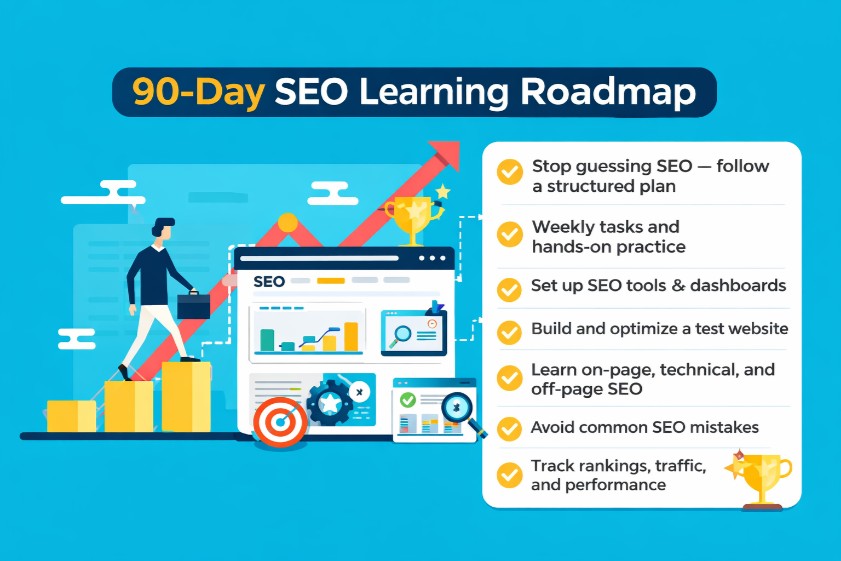
Stop guessing SEO and start practicing with a roadmap that builds real skills in 90 days. I learned the hard way—bouncing between tutorials, bookmarking endless threads about Google algorithm updates, and trialing every shiny SEO tool without a plan. Progress felt random, and it was hard to tell what actually moved the needle.
Here's the fix: a step-by-step plan with weekly tasks, practice labs, templates, and a real case study. You’ll set up your tools, build a test site, master SEO basics like on-page SEO, technical SEO, and off-page SEO, avoid common mistakes, and track results with dashboards. If you’re wondering how to learn SEO without drowning in theory, this roadmap makes it tangible.
What Is SEO and How Search Engines Work
Everything else in this plan rests on understanding how search engines discover and rank content. Once you grasp these fundamentals, every decision—from keyword research to content optimization—becomes intentional, not guesswork.
Crawling, Indexing, and Ranking
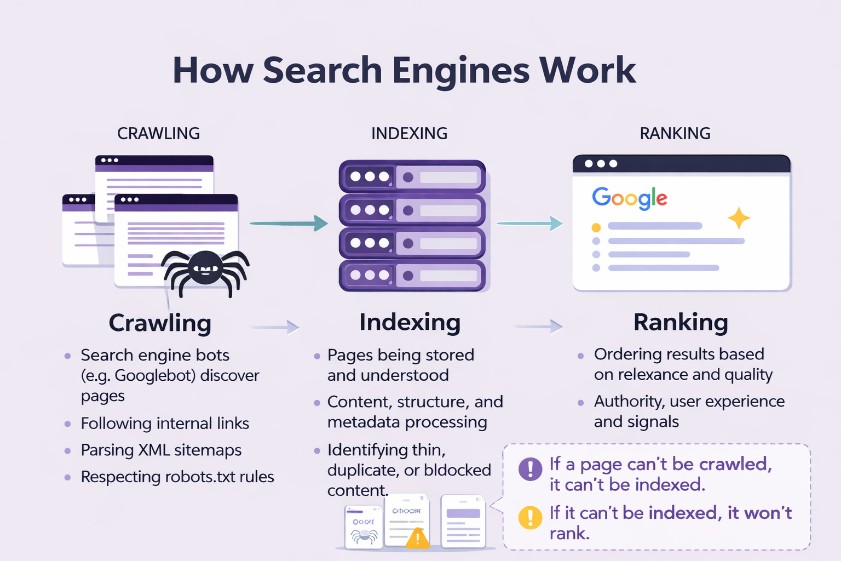
Search engines use crawlers (like Googlebot) to discover pages. Crawling is simply the process of following links, parsing sitemaps, and evaluating robots.txt directives. Indexing is when the engine stores and understands your page's content, structure, and metadata. Ranking is the ordering of results based on relevance, quality, and search engine ranking factors such as authority and user experience.
If Google can't crawl your pages (blocked by robots or poor internal linking), it can't index them; if it can't index them, you won't rank. I've seen sites fix a single robots.txt rule and unlock hundreds of indexed pages overnight. Start with a site audit to catch crawl traps, orphan pages, and thin content that may be ignored.
Search Intent and SERP Features
Every query has intent: informational (how-to guides), transactional (buy now), navigational (brand/site names), and commercial investigation (best, vs, reviews). Map your content to the right intent. If the SERP is full of list posts and comparisons, your product page will struggle. If it's dominated by videos and images, consider multimedia.
SERP features matter: featured snippets, People Also Ask, local pack, images, and videos can steal clicks even if you're not in position one. Pro tip: analyze three target SERPs and reverse-engineer content types, length, and formats that rank. Common mistake: optimizing blindly without studying intent. Fix it by doing a SERP teardown before writing—document what ranks, why, and how your page will meet (not fight) that pattern.
How Google Evaluates Content (E-E-A-T)
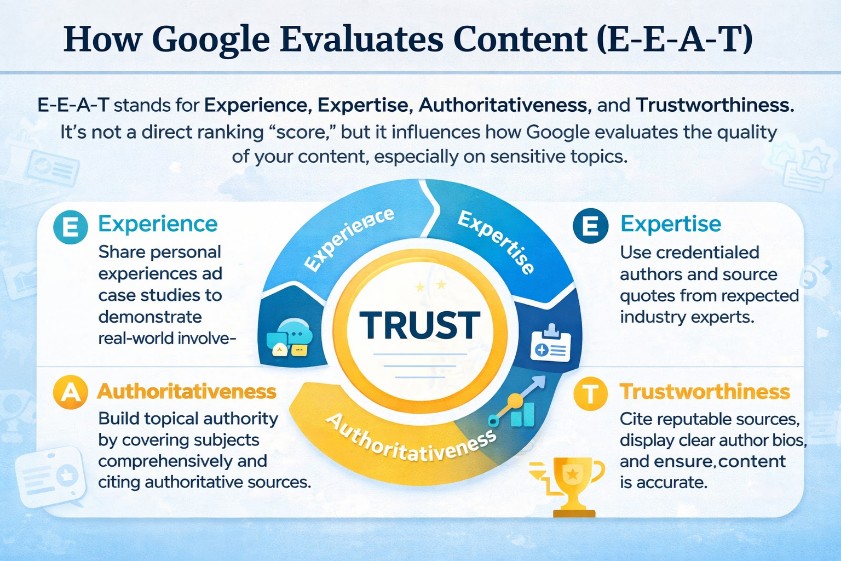
E-E-A-T stands for Experience, Expertise, Authoritativeness, and Trustworthiness. It's not a direct ranking "score," but it influences how Google evaluates the quality of your content, especially in sensitive topics. Build topical authority by covering a subject comprehensively and demonstrating real-world experience—case studies, data, and transparent methodology.
Use signals that reinforce trust: author bios with credentials, references to credible sources, clear editorial policies, and an editorial change log. I've seen content move after adding expert quotes and citing primary data sources. E-E-A-T doesn't replace fundamentals like crawling and indexing; it amplifies them. When you plan how to learn SEO, weave E-E-A-T into your content strategy from day one.
Prerequisites: Set Up Your SEO Learning Environment
Before we hit the 90-day plan, get your sandbox ready. This section removes friction so you can practice immediately and measure what matters
Essential Accounts (GSC, GA4, Bing Webmaster Tools)
Create accounts for Google Search Console (GSC), Google Analytics 4 (GA4), and Bing Webmaster Tools. Verify your site or sandbox environment and submit a sitemap. GSC tells you about indexing, queries, and coverage issues; GA4 shows user engagement and conversions. Bing's tools offer additional insights—handy for crawling and indexing diagnostics.
Install a crawler like Screaming Frog (free mode works well for small sites), a keyword tool (Ahrefs/SEMrush trials or free alternatives), and an optional rank tracker. These are your core SEO tools. Pro tip: don't wait for the perfect setup—verified access to GSC/GA4 is enough to start. Common mistake: stalling until you buy hosting or a fancy theme. Use a free platform today and migrate later.
Practice Without a Domain (GitHub Pages, Notion, free CMS)
If you don't have a domain, set up a practice environment: GitHub Pages, Netlify, WordPress.com, Notion with a site wrapper (Super/Feather), or a free Webflow plan. Publish at least one pillar page and a few cluster articles so you have material to optimize. Submit your sitemap to GSC, and watch crawling and indexing behavior over the first week.
This removes excuses and lets you practice: write meta titles and descriptions, update H1–H3s, add internal links, and fix robots.txt if needed. It's perfectly fine to learn technical SEO in a sandbox. I've trained teams entirely on a staging site—skills transfer directly.
Complementary Skills (HTML/CSS basics, JS awareness, spreadsheets)
You don't need to be a developer to learn SEO for beginners, but knowing HTML/CSS helps: understand header tags, alt attributes, canonical tags, meta titles and descriptions, and schema basics. Be aware of JavaScript implications (client-side rendering delays, hydration issues) and how they affect crawling and indexing.
Get comfortable with spreadsheets: filters, pivots, VLOOKUP/XLOOKUP, and simple formulas. You'll use sheets for keyword research, content mapping, and site audits. Pro tip: a small amount of technical literacy accelerates everything—from debugging indexation issues to improving Core Web Vitals (CWV). Build this foundation early.
The 30/60/90-Day SEO Learning Plan
With the environment ready, here's the structured path. I timebox labs to 90–120 minutes to avoid analysis paralysis. Each block has clear deliverables so you can measure progress.
Days 1–30: Foundations, Keywords, and On-Page
Days 1–7:
- Set up GSC/GA4 and Bing Webmaster Tools.
- Run a baseline site audit with Screaming Frog.
- Pick a niche and list 20 seed topics.
Deliverable: SERP analyses for five keywords—document intent, content types, word counts, and common SERP features.
Days 8–14:
- Keyword research lab: build a sheet with intent, difficulty, volume, SERP notes, and priority.
- Add business fit and funnel stage (TOFU/MOFU/BOFU).
Deliverable: content map that assigns primary keywords to URLs to avoid cannibalization.
Days 15–30:
- On-page SEO lab: write three pages. Craft titles/meta for CTR, set H1–H3s, add internal links, and optimize images with alt text.
- Use a simple on-page checklist
Deliverable: three optimized pages and the checklist applied. Pro tip: don't skip SERP teardowns before writing. Common mistake: chasing high-volume keywords without intent match.
Days 31–60: Technical SEO and Content Strategy
Days 31–45:
- Technical SEO lab: fix indexing issues, create sitemap and robots.txt, set canonical tags, resolve 404/301 patterns, and check CWV basics.
Deliverable: a mini technical audit with prioritized fixes.
Days 46–60:
- Content lab: publish one pillar article (1,500–2,000 words) and three clusters (800–1,200 words) mapped to intent.
- Build internal linking structure: breadcrumbs, contextual links, and a logical URL hierarchy.
Deliverable: internal linking map and a content brief template. I've seen sites jump impressions in GSC once this structure exists and pages are interlinked properly.
Days 61–90: Internal Linking, Links, and Reporting
Days 61–75:
- Link building & digital PR lab: identify prospects, craft outreach scripts, and publish a linkable asset (checklist, calculator, original data).
Deliverable: 20 personalized outreach emails sent and at least two warm replies.
Days 76–90:
- Measurement and reporting: set KPIs (clicks, indexed pages, CWV pass rates), create a Looker Studio dashboard pulling GSC/GA4, and establish a cadence.
Deliverable: a 90-day report with screenshots, annotations, and lessons. Pro tip: timebox each lab to keep momentum. Common mistake: skipping measurement. Fix it by tracking three primary KPIs from day one.
Weekly Checkpoints, Quizzes, and Deliverables
Add weekly checkpoints:
- 10-question quiz covering topics completed that week.
- Skill checklist updates (research, on-page, technical, content, links, measurement).
- Self-audit rubric with A/B/C grades.
Deliverables each week:
- A SERP teardown for one new keyword.
- One content brief or technical fix documented in your change log.
- A dashboard annotation for any test run.
This cadence builds the habit of reflection and iteration, which is where actual SEO growth happens. If you've asked yourself how to learn SEO systematically, weekly checkpoints are your guardrails.
Core Skills Deep Dive: Keyword Research, On-Page, Technical, Content, Links
Now that you've run sprints across the pillars, dive deeper. This isn't theory—I've applied these frameworks on dozens of sites and watched them unlock traffic.
Keyword Research (Intent, Difficulty, SERP Analysis)
Start by listing seed topics, then expand via a keyword tool. Group by intent (informational, transactional, navigational, commercial investigation) and cluster related queries under a primary topic. Validate with SERP analysis: look at what ranks, content types, word count ranges, and special SERP features.
Prioritize by business fit and competitiveness. Don't chase volume alone—low-competition, intent-matched topics often produce faster wins. Build a keyword-to-URL mapping sheet to track coverage and avoid cannibalization. I once merged three overlapping posts into a single guide after mapping; rankings stabilized and CTR improved.
On-Page SEO (Titles, Meta, Headings, Internal Links)
Craft titles that promise clear outcomes and naturally include the primary keyword. Write meta descriptions that earn the click—benefits + qualifiers + a subtle CTA. Maintain a logical H1–H3 structure with scannable sections. Use contextual internal links to guide users (and crawlers) to related content.
Optimize medicompress images, add descriptive alt text, and use video transcripts if applicable. Keep URLs clean and consistent. I've seen a page move from position 10 to 4 by tightening title/meta, adding a comparison table, and linking from a pillar page. On-page small tweaks compound.
Technical SEO (Indexing, Sitemaps, Robots, Canonicals, CWV)
Ensure crawlability: robots.txt shouldn't block important pages; XML sitemaps should reflect canonical URLs. Fix indexation issues in GSC Coverage, set canonical tags to prevent duplicates, and maintain clean 404/301 patterns. Test mobile-first rendering—a page that looks fine on desktop but breaks on mobile will underperform.
Core Web Vitals (CWV) are practical, not theoretical. Measure LCP, INP, and CLS with PageSpeed Insights and the CWV report in GSC. Improve by optimizing hero images, lazy loading non-critical media, deferring scripts, and avoiding layout shifts with explicit size attributes. These fixes impact UX and ranking potential.
Content Strategy (Topical Depth, E-E-A-T, Freshness)
Build topical authority with pillars and clusters that cover an entire theme end-to-end. Demonstrate experience—share case studies, results, and screenshots. Cite credible sources (Google Search Central docs, primary research). Keep content fresh: update stats, add FAQs, and reflect changes in the field.
Structure content for readability: summaries, bullet lists, and comparison tables. Consider user stages (awareness to decision) and map content accordingly. I refresh high-traffic articles quarterly; it's common to see a bump in impressions when freshness and comprehensiveness improve.
Link Building & Digital PR (Quality, Relevance, Outreach)
Focus on relevance and authority over raw quantity. Create linkable assets: original data studies, calculators, or field-tested checklists. Personalize outreach—reference their recent posts, explain the value to their audience, and avoid spam tactics. One well-placed link from a niche-relevant site can outperform ten random directory links.
Combine internal linking with external links to amplify impact. Document outreach in your spreadsheet: prospect, contact, response, and outcomes. When you think about how to learn SEO, link building teaches you messaging, positioning, and relationship-building—skills that carry beyond rankings.
Tools and Templates You'll Use (Free + Paid)
Tools don't win SEO—operators do. Still, the right stack saves time and provides clarity. Pick one set and master it.
Essential Free Tools (GSC, GA4, Screaming Frog, PageSpeed)
- Google Search Console: indexing status, queries, sitemap, and enhancements (schema).
- GA4: engagement and conversion tracking; set custom events for scroll depth and outbound clicks.
- Screaming Frog (free mode) or Sitebulb trials: crawling for broken links, metadata, canonicals.
- PageSpeed Insights: CWV metrics and actionable recommendations.
This stack covers site audit, crawling and indexing checks, and performance optimization. Use them weekly to track changes and confirm fixes.
Useful Paid Tools (Ahrefs/SEMrush, Surfer/ClearScope, Sitebulb)
- Ahrefs or SEMrush: keyword research, competitor analysis, link profiles, content gaps.
- Surfer or ClearScope: content optimization against top-ranking pages; great for briefs and on-page improvements.
- Sitebulb: deeper technical audits, visual crawls, and reporting.
Optional: a rank tracker for trend monitoring—useful once you're publishing consistently. Common mistake: tool hopping. Fix by committing to one stack and mastering core features.
Templates and Scripts (Keyword Sheet, On-Page Checklist, Technical Audit, Outreach Emails)
- Keyword research spreadsheet with intent, difficulty, volume, business fit, and SERP notes.
- On-page optimization checklist: titles, meta, H1–H3, internal links, images/alt, schema, and CWV basics.
- Technical audit checklist: robots.txt, sitemap, canonicals, 404/301, URL hygiene, CWV, structured data.
- Outreach email scripts: personalized, value-first pitches for linkable assets.
Keep templates in a shared folder and use version control. I add a Diagnostics tab to audits to track issue, impact, fix, and owner.
AI in SEO Workflows (Briefs, Clustering, QA)
Use AI to:
- Generate content briefs and outline sections.
- Cluster keywords by intent and theme.
- Draft FAQ suggestions and meta variations.
- QA content for tone consistency and missing subtopics.
Avoid publish-without-human-editing. AI accelerates drafts; your expertise ensures accuracy, E-E-A-T signals, and business relevance. Pro tip: build a simple Looker Studio dashboard for weekly reporting tied to your 90-day goals.
Practice Project: Build and Optimize a Test Site
Nothing cements learning like shipping. Let's build a small site and optimize it end-to-end. Think of this as your SEO lab.
Pick a Platform and Niche
Choose a platform you can launch today: WordPress.com, GitHub Pages, or Webflow's free plan. Pick a narrow niche to earn topical authority faster: e.g., "home espresso troubleshooting" beats "coffee" as a topic. With a tight focus, your pillar and clusters cover the niche thoroughly and match intent better.
Define your audience and goals: are you driving email signups, affiliate clicks, or demo requests? This frames keywords, content types, and measurement later.
Baseline Audit and Quick Wins
Run a baseline crawl to identify broken links, missing titles/meta, and duplicate H1s. Fix the obvious. Create a sitemap and robots.txt, then submit to GSC. Check coverage issues and indexing rates; ensure canonical tags are set correctly.
Quick wins:
- Add descriptive titles/meta.
- Compress large images for LCP improvements.
- Fix 404s and streamline redirect chains.
- Add Breadcrumb schema to reinforce structure.
These changes often produce early improvements in impressions.
Publish a Pillar Page and Three Clusters
Publish one pillar page (1,500–2,000 words) and three clusters (800–1,200 words). Map each to a specific intent:
- Pillar: "Home Espresso Guide: Setup, Maintenance, Common Fixes" (informational).
- Cluster 1: "Best Espresso Machines Under $500" (commercial investigation).
- Cluster 2: "How to Fix Bitter Espresso" (informational/problem-solving).
- Cluster 3: "Breville vs. De'Longhi: Which Is Better?" (comparison).
Write content briefs for each cluster and establish the internal linking plan before publishing. This avoids cannibalization and keeps your site coherent.
Internal Linking and Navigation
Add contextual internal links from clusters to the pillar and vice versa. Use breadcrumbs and a logical URL structure (e.g., /espresso-guide/, /espresso/espresso-bitter-fix/). Update navigation to surface key pages—pillar, top clusters, and your linkable asset. These signal importance to users and crawlers.
I've seen crawl depth improvements and faster indexing simply by strengthening internal links. It's one of the highest-ROI tasks in on-page SEO.
Collect Data and Iterate
Set up GA4 events for scroll and outbound clicks; track GSC metrics like clicks, impressions, and indexed pages. Review weekly:
- Which queries are emerging?
- Are pages indexed and stable?
- Any CWV regressions?
Iterate: adjust titles/meta for CTR, add FAQs to address People Also Ask questions, expand sections that underperform, and keep refining internal links. Pro tip: create a linkable checklist or calculator early; it makes outreach more natural. Common mistake: thin tag/category pages—noindex low-value archives or add unique summaries.
Role-Based Learning Paths
Different roles should emphasize different skills. Pair these paths with your 90-day plan to move faster without stepping on toes.
Marketer: Content & Measurement
Focus on keyword research, content mapping, and reporting. Build a monthly content calendar and track KPIs (clicks, indexed pages, conversions). Deliverable: a monthly KPI report and a pipeline of briefs. Learn to segment GA4 and GSC by intent and page type (pillar vs. cluster).
Pro tip: marketers should run SERP teardowns weekly to stay aligned with search intent shifts. Avoid vanity metrics—tie actions to outcomes in dashboards.
Developer: Technical SEO & CWV
Prioritize crawlability, indexation, CWV, and structured data. Build a technical backlog with fixes for robots.txt, sitemap generation, canonical consistency, and schema types (Article, FAQ, Breadcrumb). Deliverable: CWV improvements (LCP/INP/CLS) and an annotated change log.
Pro tip: devs should attend content brief reviews; understanding intent informs decisions like rendering strategies and component loading.
Content Writer: On-Page & E-E-A-T
Master briefs, intent matching, on-page structure, citations, and experience signals. Deliverable: five optimized articles with clean H1–H3s, internal links, and references to authoritative sources. Add author bios and an editorial change log to strengthen E-E-A-T.
Pro tip: join technical audits to learn how rendering and performance affect your content's visibility.
Small Business Owner: Local SEO & Basics
Set up Google Business Profile (GBP), ensure NAP consistency, build citations, and establish a review system. Create local landing pages for service areas with unique content (photos, testimonials, FAQs). Deliverable: a local SEO checklist completed and monthly review requests sent.
Common mistake: working in silos. Fix it with shared docs and weekly standups aligned to the roadmap.
Local SEO and Niche Paths
Different site types require different playbooks. Tailor your labs to your model for better results.
Local SEO Basics (GBP, NAP, Citations, Reviews)
Claim and optimize GBP: categories, services, photos, and updates. Ensure NAP (Name, Address, Phone) consistency across directories. Build citations (industry and local) and implement a review process: ask after service, provide a simple link, and respond professionally.
Create local landing pages with unique content: testimonials, local case studies, photos, and FAQs. Pro tip: add service-area pages with embedded maps and structured data for LocalBusiness. This is pragmatic SEO that wins in the real world.
Ecommerce SEO (Faceted Navigation, PDPs, Schema)
Ecommerce sites struggle with faceted navigation exploding indexable URLs. Control crawl with robots rules, nofollow on filter links when warranted, and canonicalization to primary listing pages. Optimize category pages with intro copy, FAQs, and filters. PDPs need unique descriptions, high-quality images, reviews, and Product schema.
Avoid duplicate content across variants; consolidate when possible and use canonical tags wisely. I've seen dramatic crawl efficiency improvements after taming filter combinations.
SaaS SEO (Use Cases, Comparison Pages, Docs)
SaaS sites win with bottom-of-funnel pages: "alternatives," "vs" comparisons, "pricing," and detailed use cases. Build robust documentation and link it from support and product pages. Demonstrate topical authority with clusters around problems your product solves.
Include trust signals: case studies, security pages, and author expertise. This blend of E-E-A-T and intent-aligned content drives qualified organic demos.
Publishers/News (Freshness, Indexing, Top Stories)
Publishers need fast indexing, freshness, and clean structured data for Top Stories. Use Article and NewsArticle schema, ensure AMP or lightning-fast pages, and avoid thin syndication. Keep canonical references tidy when republishing.
Monitor GSC enhancements and index coverage daily. Freshness is king—update articles, add context, and link to related coverage for discoverability.
Measurement Framework & Reporting
Measurement converts practice into progress. Tie actions to outcomes so you know what works and what to repeat.
Define KPIs Aligned to the 90-Day Plan
Choose 3–5 KPIs:
- GSC clicks and impressions.
- Indexed pages percentage.
- CWV pass rates (LCP, INP, CLS).
- Conversions from organic (GA4).
- Backlink growth and referring domains.
Align KPIs with your labs: on-page work should lift CTR and impressions; technical fixes should increase indexed pages and CWV passes; outreach should grow links.
Build Dashboards (Looker Studio)
Create a simple Looker Studio dashboard pulling GSC and GA4 data. Segment by page groups (pillar/cluster) and intent. Add filters for date ranges and annotations for changes.
Visualizing trends makes issues obvious: if content expands but indexed pages stagnate, you have a crawl or canonical problem. I keep one dashboard per project with a 90-day view and weekly annotations.
Reporting Cadence and Change Logs
Establish weekly reporting: share KPIs, wins, and issues. Maintain a change log documenting tests, fixes, and content updates with timestamps. This builds institutional memory and helps correlate cause and effect.
Pro tip: add annotations for algorithm updates to correlate impact without panic. Common mistake: reporting vanity metrics without context. Fix by linking actions to KPI movements (e.g., "Added FAQs → +12% CTR").
Goal Setting and Benchmarks
Set realistic 90-day targets:
- +20% impressions (GSC).
- Index 95% of published pages.
- CWV pass rate >85%.
- Two to five quality backlinks.
Benchmark against your niche and starting baseline. Goals should be ambitious but achievable—use them to prioritize sprints and say no to distractions.
Structured Data & SERP Features
Schema isn't magic, but it helps search engines understand your content and can improve visibility and CTR.
Schema Basics (FAQ, Article, Product, Breadcrumb)
Start with safe, high-impact schema types:
- Article: for blog posts and guides.
- FAfor on-page question-and-answer sections.
- Breadcrumb: reinforce site hierarchy and improve SERP display.
- Product/Review: for ecommerce PDPs with correct price, availability, and ratings.
Schema should reflect on-page content; don't add it just for rich results. I typically bundle Breadcrumb schema into most sites—it's low effort and supports internal linking clarity.
Rich Results and CTR
Rich results—stars, FAQs, and breadcrumbs—can boost CTR even if you're not top three. Featured snippets and People Also Ask boxes often trigger when your page directly addresses questions. Use clean headings and concise answers to increase eligibility.
Measure the impact: watch CTR in GSC before and after implementing schema or on-page Q&A sections. Sometimes a modest position plus a rich result beats a higher rank without enhancements.
Implementation and Validation
Implement via CMS plugins (WordPress includes options) or JSON-LD snippets. Validate using Google's Rich Results Test and monitor GSC Enhancements for warnings. Keep schema updated when content changes.
Common mistake: misusing schema (e.g., stuffing irrelevant FAQs). Fix by following Google guidelines and ensuring schema mirrors visible content. Pro tip: validate after every deployment to catch regressions.
Core Web Vitals, Accessibility, and UX
Google cares about users. Performance and accessibility are table stakes if you want durable rankings and trust.
Performance (LCP, INP, CLS)
Prioritize:
- LCP: optimize hero images and server response. Use modern formats (WebP/AVIF) and preload critical assets.
- INP: reduce JavaScript bloat, defer non-critical scripts, and minimize main-thread work.
- CLS: reserve space for images/ads and avoid late-loading fonts that shift layout.
Use Lighthouse and WebPageTest to diagnose issues and track improvements. I've seen pages jump in mobile rankings after shaving 1–2 seconds off LCP.
Mobile-First and Responsive Design
Design for mobile-first: readable fonts, adequate line height, accessible tap targets, and fast loads on 3G-equivalent connections. Test across devices and ensure critical interactions don't rely on hover.
Mobile is often the majority of organic traffic. If your page renders slowly or awkwardly on mobile, you're burning opportunities. Keep navigation simple and surface key pages clearly.
Accessibility Essentials (Alt Text, ARIA, Contrast)
Add descriptive alt text to images, use semantic HTML (header, main, footer), define ARIA landmarks where needed, and ensure color contrast meets WCAG standards. Accessibility improves UX for everyone and reduces friction for screen readers.
Audit with Lighthouse accessibility checks, and fix issues systematically. Common mistake: heavy third-party scripts that break performance and accessibility. Audit trackers and widgets; remove what's not essential.
Common Mistakes & Troubleshooting Playbook
When things go sideways—and they will—use this playbook to diagnose and fix root causes, not just symptoms.
Indexing Issues (Noindex, Robots, Canonicals)
Check GSC Coverage for "Excluded" patterns. Ensure important pages aren't blocked by robots.txt or meta noindex tags. Resolve canonical conflicts—pages pointing to the wrong canonical will struggle to index. Submit updated sitemaps and request indexing when necessary.
Document changes in your Diagnostics tab: issue, impact, fix, owner. I've rescued pages stuck in "Discovered – currently not indexed" by improving internal linking and consolidating duplicates.
Thin/Duplicate Content and Cannibalization
Thin content gets ignored; duplicates confuse crawlers. Consolidate overlapping pages or canonicalize to a primary URL. Add depth with FAQs, examples, unique media, and expert quotes.
To fix cannibalization, map keywords to specific URLs and merge where needed. Update internal links to favor the primary page. I once combined four short posts into a single comprehensive guide—rankings improved and CTR went up.
Soft 404s, Redirect Chains, and Broken Internal Links
Soft 404s occur when pages return 200 OK but signal "not found" to users or crawlers. Return proper status codes and avoid placeholder pages. Clean up redirect chains—one hop is okay; three is a problem. Run sitewide crawls to fix broken internal links.
These technical hygiene tasks centralize link equity and improve crawl efficiency. It's not glamorous, but it works.
Content That Misses Intent
Intent mismatch kills rankings. Rewrite titles/meta to align with the query's intent. Adjust format (how-to, comparison, list, FAQ) based on what the SERP favors. Add missing sections to match user expectations.
Validate by re-running SERP analysis and watching CTR and position shifts in GSC. Common mistake: fixing symptoms, not causes. Use crawl data plus GSC metrics to confirm hypotheses before changes.
Staying Current with Algorithm Changes
SEO evolves. Stay informed, test pragmatically, and don't chase every rumor.
Trusted Sources and Newsletters
Follow Google Search Central Blog and documentation. Subscribe to reputable publications and podcasts. I keep a short list of trusted sources and ignore noisy speculation.
Summarize key updates monthly and note how they might affect your site—especially topics like helpful content, spam policies, and CWV changes.
Test, Document, and Iterate
Run small tests: change a section format, add FAQs, adjust internal links. Document results and update your change log. Over time, you'll learn what moves your KPIs.
Pro tip: create a monthly digest summarizing industry changes and your adaptations. Measured experiments beat hot takes.
Community and Events
Join communities (Slack groups, forums), attend webinars, and participate in local meetups. Hearing how others troubleshoot issues accelerates learning. Share your experiments and results—you'll get feedback that sharpens your approach.
Common mistake: reacting to every chatter spike. Focus on principles, data, and controlled tests.
Real Case Study Walkthrough (Baseline → Improvements → Results)
Here's a condensed walkthrough of a 90-day project I ran for a small niche blog. It mirrors the roadmap above and shows what actually changed.
Baseline: Audit, Metrics, and Goals
Baseline crawl revealed:
- 38 indexed pages, 12 excluded due to duplicate content.
- Mixed canonicals and messy internal linking.
- LCP ~3.8s on mobile.
GSC showed ~1,200 clicks/month and 40k impressions. Goals for 90 days:
- +25% impressions.
- Index >95% of pages.
- CWV mobile pass rate >80%.
- Two quality backlinks.
Actions: Content, Technical, and Links
Technical:
- Fixed robots.txt and sitemap coverage.
- Cleaned canonicals and redirect chains.
- Optimized images and deferred non-critical JS for LCP.
Content:
- Published one pillar and three clusters with solid briefs.
- Added FAQs to match PAA patterns.
- Strengthened internal linking with breadcrumbs and contextual links.
Links:
- Released a "Coffee Brew Ratio Calculator" as a linkable asset.
- Sent 25 personalized outreach emails to niche blogs and communities.
Results: GSC/GA4 Screenshots and KPIs
Outcomes at day 90:
- Impressions +31%; clicks +18%.
- Indexed pages: 96% (up from 76%).
- CWV mobile pass rate: 86% (LCP improved to 2.4s).
- Three new referring domains from relevant niche sites.
GSC showed improved CTR on cluster articles after adding FAQs and tweaking titles. GA4 indicated longer engagement and more scroll depth on the pillar page.
Lessons Learned and Next Steps
What moved the needle:
- Consolidating duplicates and fixing canonicals unlocked indexing.
- Pillar/cluster strategy boosted topical authority.
- The calculator asset made outreach natural and effective.
What didn't:
- Targeting one high-volume head term wasted time early. Better to stack wins with intent-matched, lower competition keywords.
Next steps: expand clusters, keep refreshing content quarterly, and build one more linkable asset. Pro tip: annotate dashboards for major changes; it's easier to correlate impact when reviewing.
Assessment: Quizzes, Skill Checklist, and Self-Audit Rubric
Practice sticks when you test yourself and reflect. Bake assessment into your routine.
Weekly 10-Question Quizzes
Create short weekly quizzes covering:
- SERP analysis and intent matching.
- Keyword clustering and prioritization.
- On-page elements (titles/meta/H1–H3).
- Technical basics (indexing, canonicals).
- Links and outreach best practices.
Score it, note gaps, and plan the next week's focus. Pair up with a study buddy to cross-check answers.
Skill Checklist by Pillar
Maintain a checklist:
- Research: SERP tear downs, keyword mapping sheet.
- On-page: checklist applied to each published page.
- Technical: robots/sitemap/canonicals/CWV.
- Content: briefs and E-E-A-T signals.
- Links: prospects, outreach, asset creation.
- Measurement: dashboard and change log.
Update weekly. This creates accountability and ensures balanced growth across pillars.
Self-Audit Rubric (A/B/C Grades)
Grade your site:
- Indexation health.
- On-page completeness.
- Topical coverage depth.
- Link profile quality.
- KPI trends aligned to actions.
A = strong and consistent, B = mixed, C = needs attention. Schedule 30-minute review sessions weekly. Common mistake: skipping reflection. The rubric keeps you honest.
Downloadables, CTAs, and Next Steps
You've got the plan—now grab the tools and commit to the labs. Execution beats inspiration.
Download the 90-Day Roadmap + Templates
Primary CTdownload the full 90-day roadmap, keyword research sheet, on-page checklist, technical audit checklist, and outreach scripts. Use them out of the box or adapt to your niche.
Add Article and Author schema, an author bio with credentials, and an editorial change log to build trust and E-E-A-T on your site.
Join the 7-Day Setup Challenge
Secondary CTAs: join the free 7-day email challenge to set up GSC/GA4, launch your practice project, and complete your first labs. Subscribe to monthly updates covering the latest changes and the best ways to adapt.
Don't hoard templates—commit to one lab per day.
Book a Beginner Site Audit or Coaching
Optional: book a beginner site audit or coaching session to accelerate progress and get personalized feedback. We'll review your dashboard, change log, and deliverables, then prioritize fixes and next steps.
This structured support is a force multiplier when you're learning how to learn SEO efficiently.
Conclusion
SEO is best learned by doing: set up your tools, build a practice site, and follow this 30/60/90-day plan. Master core skills across keyword research, on-page SEO, technical SEO, content optimization, and link building. Avoid common pitfalls and track KPIs with dashboards and a change log. If you've been wondering how to learn SEO without getting overwhelmed, download the 90-day SEO roadmap and templates, start your first lab today, and join the 7-day setup challenge.
FAQS:
Can I learn SEO on my own?
Yes—use a structured plan, practice on a test site, and measure progress with GSC/GA4. Follow trusted sources, take quizzes, and iterate.
How long does it take to learn SEO for beginners?
Expect 90 days to master fundamentals with weekly labs; proficiency comes from ongoing practice, testing, and reporting.
Do I need coding skills to learn SEO?
No—but basic HTML/CSS and JS awareness help with technical fixes, CWV improvements, and communication with developers.
What are the best free resources or courses to learn SEO?
Google Search Central docs, GA4 help center, reputable blogs/podcasts, and this roadmap with templates and practice labs.
How do I practice SEO without a website?
Use GitHub Pages, WordPress.com, Notion + site wrapper, or Webflow free plan; set up GSC, publish content, and audit.
Is SEO hard to learn and what are the common mistakes?
It's learnable with structure; common mistakes include intent mismatch, indexing issues, thin content, and ignoring measurement.
Which SEO tools should beginners start with?
Start with GSC, GA4, a free crawler, PageSpeed Insights, and a keyword tool; add paid tools once you need scale.
How do I stay up to date with Google algorithm changes?
Follow official docs/blogs, subscribe to reputable newsletters, run small tests, maintain a change log, and focus on fundamentals.