
Struggling with flat traffic, crawling issues, or rankings that won't budge? A structured SEO audit can uncover the exact fixes that move the needle.
Most audits I see are scattered checklists that don't tie findings to business impact. Without clear goals, prioritization, and tool-driven proof, you end up with busywork and missed wins.
Here's the repeatable way I run audits: a 60-minute quick triage, a full deep-dive checklist, a prioritization matrix, and a downloadable template—powered by GA4 and Google Search Console—so you can turn insights into measurable growth. If you've been wondering how to do an seo audit without drowning in docs, this is the playbook I use in client sprints.
What Is an SEO Audit? Scope, Tools, and What Success Looks Like
Define the audit scope: technical, content, and off-page
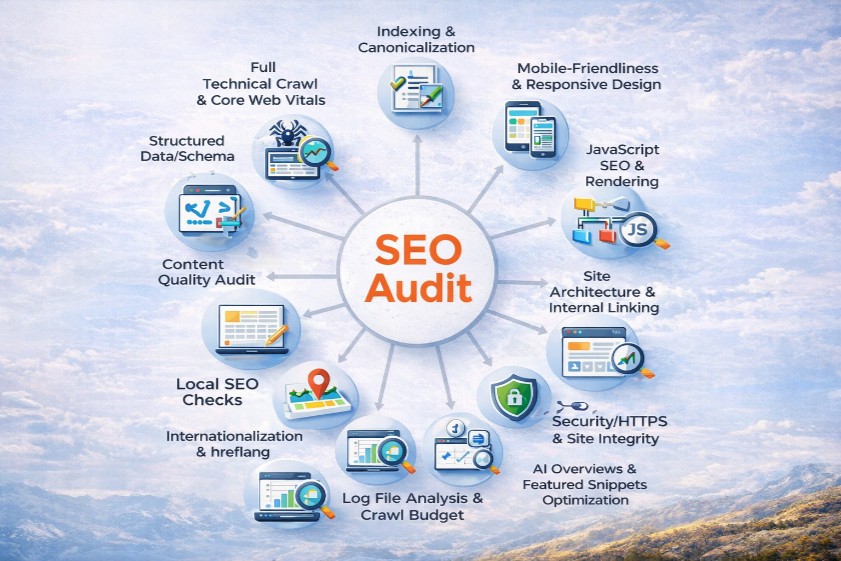
A solid audit covers three layers: technical SEO, content, and off-page. Technical means site indexing, crawlability, canonical tags, site speed, Core Web Vitals, mobile-friendly UX, and JavaScript rendering. Content focuses on intent alignment, on-page SEO, internal linking, duplicate content, and quality signals that meet Helpful Content guidelines. Off-page digs into your backlink profile, brand mentions, and authority-building with digital PR.
If local or international SEO matters, fold in Google Business Profile, NAP consistency, and hreflang. Scope creep is the biggest killer of progress. I always document what's in and out, which sections map to business goals, and what templates we'll assess first (homepage, category, product, blog). That discipline keeps findings actionable rather than turning into a 70‑page PDF no one reads.
Audit outcomes: visibility, crawlability, UX, and revenue impact
Audits should tie directly to business outcomes. Visibility metrics like impressions and rankings matter, but I treat them as leading indicators. The end goal is qualified organic traffic, engagement, and revenue. I track index coverage improvements, reduced crawl errors, better CWV scores, and UX fixes that lift conversion rates.
Think of crawlability as your foundation. If Google can't reach important pages or is wasting crawl budget on parameter junk, every content and link effort underperforms. UX isn't just pretty pages—it's fast LCP, stable CLS, and clean information architecture that helps users and bots. When I ran a triage for a B2B SaaS site, consolidating duplicate content and fixing canonicals lifted organic traffic analysis metrics by 22% and form fills by 17% in six weeks. That's the kind of impact we're aiming for.
Success criteria: KPIs, E-E-A-T signals, and reporting cadence
Define success upfront. I set targets like 10–20% improvement in index coverage, +15% CTR on top pages, and a 90% drop in 4xx errors within 30 days. For E‑E‑A‑T, I look for author bios, credentials, first‑party data, case studies, and citations to reputable sources. Those trust signals matter more than ever with modern SERPs and AI Overviews.
Create a one‑page brief: objectives, constraints, stakeholders, and tools. Plan deliverables: a prioritized issues list with severity, impact/effort scores, owners, due dates, and a 30/60/90‑day roadmap. Establish reporting cadence—weekly progress, biweekly dashboards, and monthly outcome reviews. When everyone agrees on KPIs and timing, the audit turns from a report into a growth program.
Prerequisites: Access, Tools, and Template Setup
Access you need: GA4, GSC, CMS, CDN, server logs, analytics
Before I touch a crawler, I secure access. GA4 for traffic and conversions. Google Search Console for impressions, indexing, and crawl errors. Your CMS (WordPress, Shopify, custom) for metadata and templates. CDN controls (Cloudflare, Akamai) to inspect caching and headers. Hosting or server access for logs and crawl stats, especially on large sites.
Missing access creates blind spots—blocked areas, staging surprises, or unapproved changes. I verify all site variants in GSC (https/http, www/non‑www, subdomains) and connect GSC data to GA4 for Search Console insights. If logs aren't available, I at least review GSC Crawl Stats. This prework saves hours and prevents “we can't see that” roadblocks mid‑audit.
Tool stack: free vs paid (Screaming Frog, PSI/Lighthouse, Semrush/Ahrefs)
You can do a lot with free tools. PageSpeed Insights and Lighthouse for Core Web Vitals, GSC for indexing and queries, and Rich Results Test for schema. But paid tools speed things up. Screaming Frog (or Sitebulb) for full technical crawls and exports. Semrush/Ahrefs for backlink profile analysis, competitor benchmarking, and keyword gap analysis.
My typical stack: - Screaming Frog for crawling and exports - PSI/Lighthouse for lab and field performance checks - GSC for coverage and query-level data - GA4 for explorations and landing page performance - Semrush/Ahrefs for links and SERP research
Choose based on site complexity and budget. A client with 40k URLs needed log analysis and crawl budget tuning; a 50‑page brochure site did fine with free tools.
Download the audit template and GA4 dashboard starter
Centralize everything in one template. I use a Google Sheets or Notion audit tracker with tabs for technical, content, off‑page, local/international, and a 30/60/90‑day roadmap. Each issue gets severity, impact/effort, owners, due dates, and evidence links (screenshots, exports). It's amazing how much faster approvals go when stakeholders can see proof.
I also spin up a GA4 dashboard starter focused on organic KPIs: top landing pages, engagement rate, conversions, and query CTR opportunities pulled from GSC. Prepare a test plan for staging vs production checks and a rollback strategy for risky changes. The template ensures progress doesn't die in Slack threads.
Set Benchmarks and Goals (GA4 + Google Search Console)
Map business goals to SEO KPIs
Every audit starts with goal mapping. If revenue is the target, I trace a KPI tree: qualified organic traffic → impressions and CTR → rankings → index coverage and Core Web Vitals. For lead gen, I tie high‑intent landing pages to conversions and assisted conversions, then backtrack to content quality and on-page SEO improvements.
This mapping keeps the work honest. For example, if blog traffic is booming but category pages are invisible, my roadmap will shift toward internal linking, canonical keywords, and template improvements that move product revenue. I annotate GA4 with deployments and track before/after to validate lift. That transparency builds trust across marketing and dev.
Build GA4 explorations and landing page reports
GA4 needs a different mindset than UA. I set up explorations that filter Session source/medium = organic and analyze Landing Page performance with conversions and engagement rate. Custom dimensions help: tag content types (blog, product, category, resources) so you can compare template performance side by side.
I like three reports: 1) Top landing pages by organic sessions with conversion rate and engagement. 2) Entrances with low CTR queries from GSC mapped to pages, to spot title/meta opportunities. 3) Organic traffic analysis by device to catch mobile friction early.
These dashboards surface quick wins. On one ecommerce site, updating titles and descriptions for 15 high‑impression category pages lifted CTR by 18% and revenue by 12% in four weeks.
Configure GSC property, sitemaps, and issue workflows
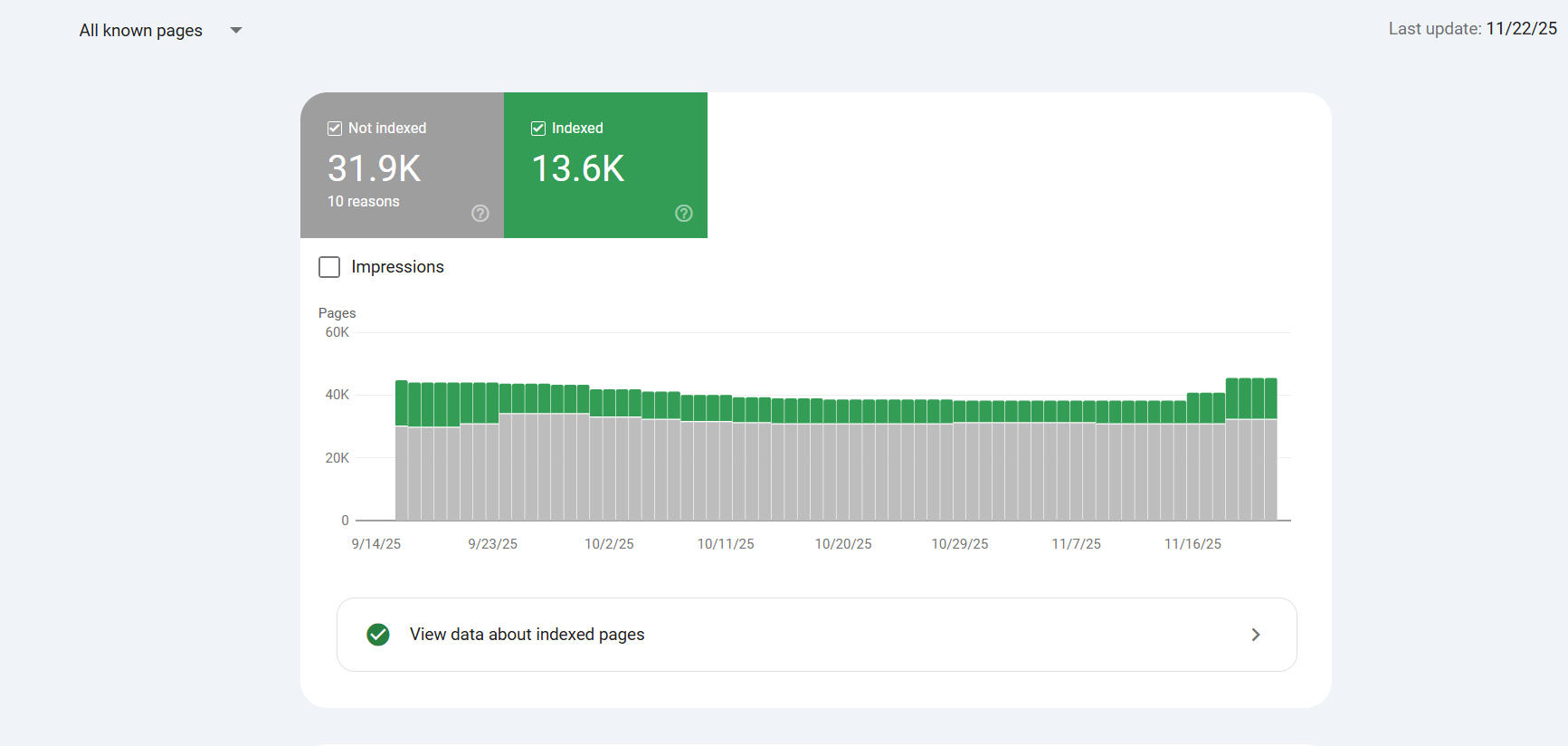
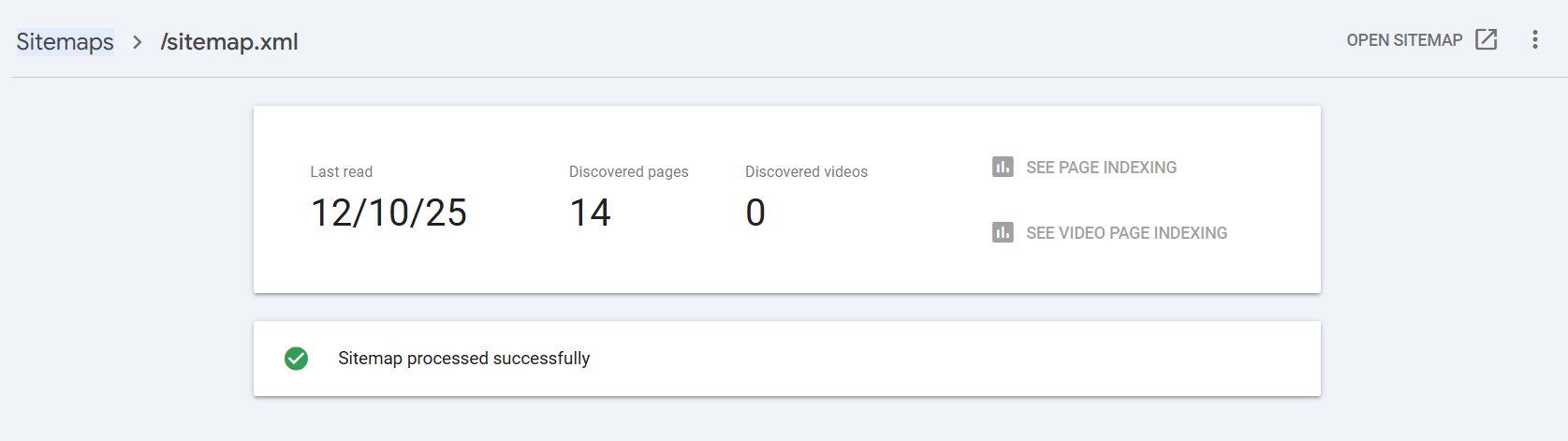
Set up GSC correctly. Verify all variants (https/http, www/non‑www) and subdomains. Submit XML sitemaps, check index coverage, and make sure important page types are included. Configure email alerts for manual actions, security issues, and indexing changes. Create saved filters for Discovered – currently not indexed, Soft 404s, and Excluded by 'noindex'.
Build workflows: when a coverage error appears, who owns it, what's the SLA, and how do we confirm it's fixed? I keep a baseline snapshot of 28–90 days of data with seasonal context and note recent site changes. Pro tip: add CWV field data trends from GSC so devs have user‑based evidence. The right setup turns GSC into an early warning system instead of a passive dashboard.
Quick 60‑Minute Triage: High‑Impact Checks to Run First
Index coverage and canonicalization sanity checks
Start in GSC Coverage. Look at Discovered – currently not indexed, Excluded by 'noindex', and Soft 404s for key templates (category/product/blog). If valuable pages are stuck in “Discovered,” your internal linking or crawl budget needs attention. Soft 404s often mask thin content or broken parameter handling.
Open a few URLs and check source: meta robots, rel=canonical, and whether the canonical points to the version you actually want indexed. Watch for conflicts between parameters, print pages, and pagination. I've seen “/?sort=popular” outrank canonical pages because internal links favor the parameter. Fixing canonical consistency alone has delivered double‑digit traffic lifts for me on retail sites. Log findings and triage owners right away.
Site versions and critical robots.txt/sitemap issues
Confirm the site resolves to a single version. Force https and pick www or non‑www. Test non‑preferred versions to ensure they 301 to the canonical hostname and don't serve 200s. A surprising number of sites still leak duplicate homepages via http or legacy subdomains.
Open robots.txt. Make sure you're not disallowing critical directories, templates, or AJAX endpoints that render essential content. Validate sitemap locations and that they load fast. Run a branded Google search and scan sitelinks, the knowledge panel, and how your homepage appears. Misleading titles or descriptions on your top pages can depress CTR quickly. I keep a hit list of 10–20 high‑impression pages for immediate title/meta improvements as fast wins.
Top-template Core Web Vitals and easy on-page wins
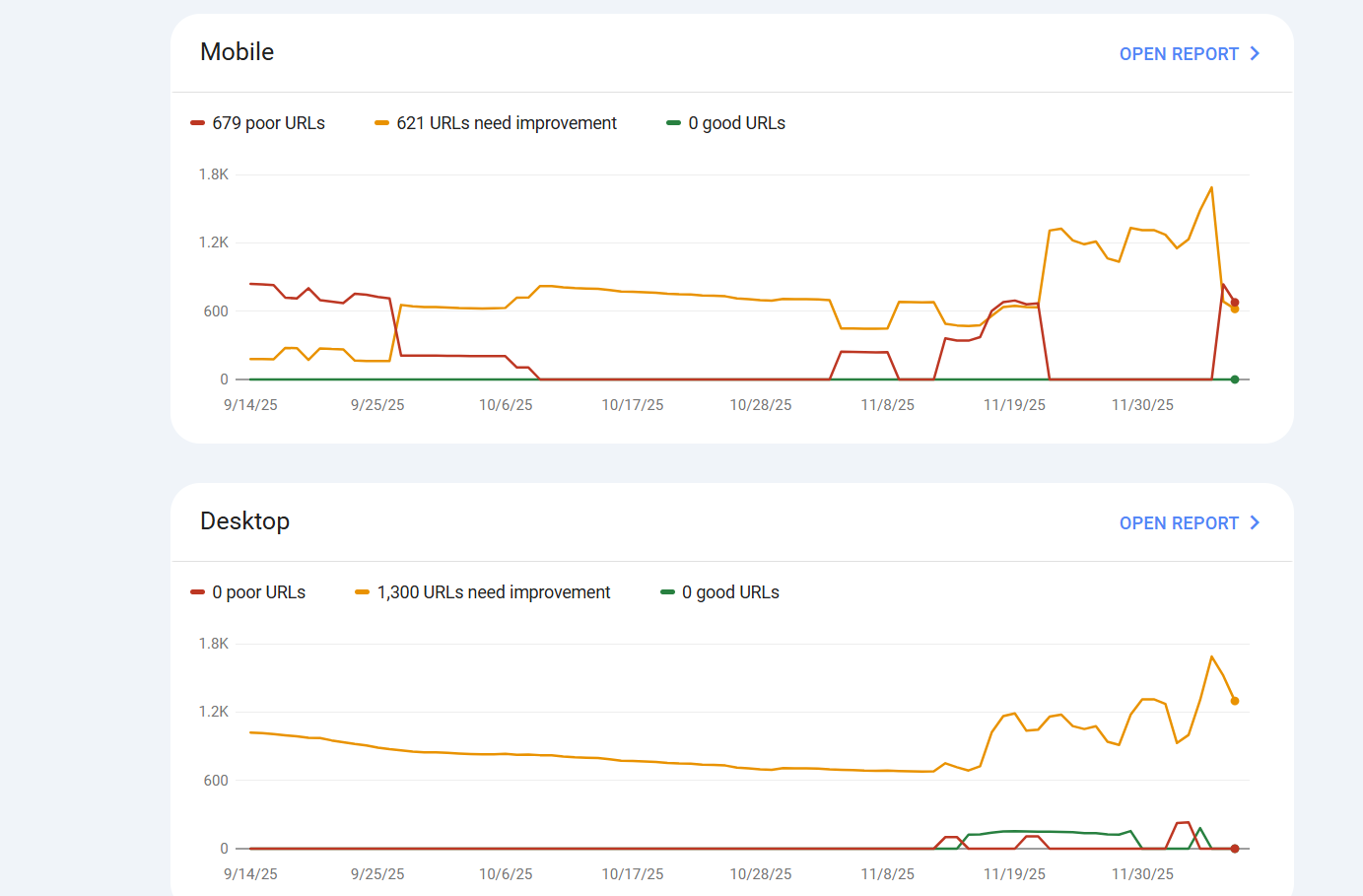
Run PSI/Lighthouse on your homepage and top category/product/blog templates. Note LCP elements, INP issues from heavy JS, and CLS from unreserved image or ad slots. Focus on templates first—optimize hero images, defer non‑critical scripts, and set width/height on media. Field data trumps lab, so cross‑check GSC CWV reports.
In Screaming Frog, scan a small sample. Flag 4xx/5xx errors, infinite redirects, missing canonicals, duplicate titles, thin pages, and broken internal linking. Create quick on‑page wins: - Rewrite titles for intent and CTR - Tighten H1–H3 hierarchy - Add descriptive image alt text - Improve above‑the‑fold messaging
I've seen CTR gains within days from better titles alone. Add quick wins and blockers to your template. Assign owners today, not next sprint.
Full SEO Audit Step‑by‑Step: Technical, Content, and Off‑Page
Indexing and canonicalization
Start with the fundamentals. Check robots.txt, XML sitemaps, meta robots tags, and rel=canonical. Validate parameter handling, pagination tags (rel=prev/next is deprecated, but logical linking still matters), and eliminate duplicate homepages across http/https/www variants. If you use canonical tags on client-side JavaScript, move them server-side so crawlers see them in the raw HTML.
I once found a print‑page template outranking product pages because canonicals were missing and internal links favored the print version. Consolidating via canonicals and redirect rules improved index coverage by 15% and lifted product CTR. Keep a running list of duplicate content patterns, then fix them at the template level.
Full technical crawl
Use Screaming Frog to crawl the site. Identify 4xx/5xx errors, redirect chains, missing or duplicate titles, meta descriptions, and H1s. Flag near-duplication and thin content, infinite facets and parameters, and broken internal links. Export issues with severity and map them to owners.
Pay attention to crawl depth and orphan pages. If valuable content is buried five clicks deep, it's effectively invisible. Configure custom extraction for canonical tags and schema. For large sites, split the crawl by directory or template to keep performance reasonable. I compare pre/post‑fix crawls to prove improvements.
Core Web Vitals and performance
Core Web Vitals correlate with UX and, indirectly, with rankings and conversions. Analyze field data (CrUX and GSC) against lab data (Lighthouse). Prioritize LCP by optimizing hero images, using responsive formats (WebP/AVIF), and enabling proper caching. Improve INP by minimizing heavy JS event handlers and breaking up long tasks. Reduce CLS by reserving dimensions and avoiding lazy-loaded layout shifts.
Work at the template level to get compounding gains. If your category pages share the same slow component, fix it once and reap benefits across hundreds of URLs. Annotate deployments in GA4 so you can correlate performance wins with traffic and conversion lift.
Mobile-friendliness and responsive design
Mobile-friendly isn't just a checkbox. Test layouts, tap targets, font sizes, and above-the-fold content. Ensure parity of content and internal linking with desktop. In GSC, check Mobile Usability and render pages to catch hidden content or blocked resources. Mobile performance often trails desktop, so prioritize mobile LCP and INP.
I like device‑split GA4 views to see engagement rate and conversions by mobile vs desktop. If mobile lags, inspect images, carousels, and JS-heavy components that slow interactions. Fixing mobile friction directly impacts revenue on ecommerce sites where 60–70% of traffic is mobile.
JavaScript SEO and rendering
Compare raw HTML to rendered DOM. If important content, title tags, or canonicals only exist post‑render, you're risking delayed indexing or misinterpretation. Check for blocked JS/CSS in robots.txt. Evaluate hydration, SSR, or pre‑rendering options for dynamic content. Avoid client-side only canonical and meta tags—render them server-side.
A JS-heavy fintech site I audited wasn't exposing FAQs and schema until after hydration. Moving key elements server-side and pre‑rendering critical templates improved rich result eligibility and CTR. Use the URL Inspection tool in GSC to see what Google actually crawls.
Site architecture and internal linking
Map your site architecture. Identify hub pages, topical clusters, and the paths users and bots take to reach money pages. Reduce crawl depth for strategic URLs, add breadcrumbs, and ensure contextual internal linking that reinforces relevance. Find orphan pages and either link them properly or consolidate.
Internal linking is one of the fastest levers. I've seen category pages jump several positions after adding relevant links from related blog posts and resource hubs. Use anchor text that reflects intent and target queries naturally. Avoid over‑indexing tags that create thin, duplicative pages.
On-page SEO and SERP optimization
Audit titles, H1–H3 hierarchy, meta descriptions, image alt text, and canonical keywords. Target the right intent—informational vs transactional—and craft copy that boosts CTR with clarity and benefits. Eliminate keyword cannibalization by consolidating overlapping pages and redirecting to the strongest URL.
Use GSC queries to spot opportunities. If a page has high impressions and low CTR, iterate titles and meta descriptions. Include structured answers or bulleted lists to win featured snippets. Keep titles under ~60 characters and meta descriptions around ~155 characters, but prioritize compelling language over rigid limits.
Content quality audit
Identify thin, duplicate, and zombie pages. Thin content offers little value; duplicate content confuses indexing; zombie pages get zero traffic and no engagement. Consolidate or redirect, then upgrade key content to meet Helpful Content standards. Add expert perspectives, data, screenshots, and first‑party evidence.
I always ask: would a subject‑matter expert sign this? For E‑E‑A‑T, include author bios, credentials, and references to credible sources (think Google's docs, web.dev, industry research). Update freshness for time‑sensitive topics. The goal is content that deserves to rank, not just pages that exist.
Structured data/schema
Implement schema where it makes sense: Article, Product, FAQ, Breadcrumb, Organization, Person, and more. Validate with Google's Rich Results Test and Schema.org standards. Don't spam FAQ—deploy it where genuinely helpful and consistent with content.
Schema supports rich results and can improve CTR. Product pages with accurate Price, Availability, and Review markup tend to outperform. Tie schema to template logic so it's consistent and doesn't break on updates. Keep an eye on warnings in GSC's Enhancements reports.
Backlink profile audit
Evaluate your backlink profile for quality, toxicity, and relevance. Look at anchor text distribution, lost links, and link velocity. Identify gaps versus competitors using Semrush or Ahrefs. Plan link reclamation (fix 404s with backlinks), digital PR, and partnerships to earn authoritative mentions.
I prefer quality over quantity. A handful of strong links from trusted publications can outperform dozens of weak ones. Build assets worth linking—data studies, interactive tools, or definitive guides. Monitor for risky patterns and disavow only when necessary.
Competitor benchmarking and keyword gaps
Benchmark your competitors on keywords, content depth, CWV, and SERP features. Use keyword gap analysis to find opportunities where competitors rank and you don't. Study their content clusters and build your own, connecting hub pages with related articles and category/product links.
Document a content gap list with intent, difficulty, and potential value. I prioritize queries with clear purchase intent and underserved angles. Competitor insights aren't about copycat content—they're signals to outdo them on quality, structure, and user experience.
Local SEO checks
For local businesses, audit your Google Business Profile. Ensure NAP consistency across citations. Review categories, services, photos, and posts. Build robust location pages with unique content, local schema, and internal linking to service areas.
Encourage reviews and respond thoughtfully. Add local business schema and embed maps where appropriate. I've seen location pages rank faster when they include FAQs, testimonials, and clear CTAs tailored to local intent.
Internationalization and hreflang
Validate hreflang implementations for language and region. Ensure canonicalization across locales doesn't conflict with hreflang references. Use proper currency, pricing, and localized metadata. Test how Google indexes each locale and whether users land on the correct version.
International sites often trip over mixed hreflang and canonical strategies. Keep a clean mapping table and verify with third‑party tools or Screaming Frog's hreflang report. If you're duplicating content for markets, localize beyond translation—examples, regulations, and offers matter.
Security/HTTPS and site integrity
Confirm site‑wide HTTPS, enable HSTS, and eliminate mixed content. Add security headers like CSP and X‑Frame‑Options. Monitor for malware warnings, manual actions, and sudden drops in GSC. Secure cookies and check for exposed admin paths.
Security issues erode trust and can nuke rankings overnight. I include CDN and WAF checks in my audit. Stable, secure sites keep both users and search engines comfortable.
Log file analysis and crawl budget
For large sites, analyze server logs or GSC Crawl Stats. Identify crawl waste on parameters, facets, or low‑value directories. Tune sitemaps to include only canonical, indexable URLs. Use robots rules and internal linking to direct crawl toward strategic content.
I once cut crawl waste by 40% for a marketplace with infinite sort/filter combinations. After tightening parameter rules and boosting links to core pages, index coverage and organic sessions grew steadily. Crawl budget is a lever you pull when scale demands it.
Accessibility and UX
Check WCAG basics: alt text, heading order, color contrast, and keyboard navigation. Avoid intrusive interstitials and popups that block content. Fix CLS sources and make forms usable for all users. Accessibility improvements often lift engagement and conversion, not just compliance.
Use Lighthouse's accessibility audits as a starting point, then test real user flows. Clear labels, descriptive buttons, and predictable navigation help both people and crawlers understand your site.
AI Overviews and featured snippets optimization
Structure content to win concise answers, featured snippets, and People Also Ask boxes. Use clear definitions, lists, and tables where relevant. Highlight entities, cite authoritative sources, and surface expert authorship. This also positions your content for AI Overviews.
I add short, scannable summaries near the top of pages and robust sections that go deeper. It's a dual strategy: good for humans and good for SERP features. If you've been learning how to do an seo audit that adapts to evolving SERPs, this is now part of the checklist.
Prioritize Fixes with an Impact/Effort Matrix and 30‑Day Roadmap
Severity scoring and impact/effort ratings
Score each issue by severity (critical, high, medium, low) and rate impact (traffic, conversions, risk) vs effort (dev hours, content time). Build a matrix: - Quick wins: high impact, low effort - Strategic projects: high impact, high effort - Tidy‑ups: low impact, low effort - Deprioritize: low impact, high effort
Common mistake: prioritizing the loudest stakeholder's request instead of data‑backed impact. I flag anything affecting index coverage, CWV, and money pages as priority. If a fix helps a template used across hundreds of URLs, it gets an impact boost.
Owner assignment and sprint planning
Assign owners for each issue—SEO, dev, content, design—and set due dates. Bundle fixes by template (e.g., category pages) for compounding gains and easier QA. Create a 30‑day roadmap: Week 1 quick wins (titles/meta, small CWV tweaks), Weeks 2–3 technical fixes (canonicals, redirects, architecture), Week 4 content refreshes and schema deployment.
Document dependencies and risks. If a change could affect revenue, run it on staging and plan rollback. Keep a changelog with GA4 annotations so you can correlate updates with performance shifts. This is how I turn audits into repeatable, sprint‑friendly programs.
Reporting cadence and stakeholder updates
Establish a reporting rhythm. Weekly progress notes focused on completed items and blockers. Biweekly GA4/GSC dashboards showing CTR gains, index coverage improvements, and Core Web Vitals movement. Monthly outcome summaries tying fixes to business KPIs.
Share evidence: screenshots, exports, and before/after charts. For leadership, keep it simple—impact, effort, and revenue implications. For operators, include the technical detail. Transparent updates build credibility and keep momentum. It's the difference between a one‑off audit and ongoing growth.
Download the SEO Audit Template and GA4 Dashboard Starter
Template overview: issues, severity, impact/effort, owners
Grab the Google Sheets/Notion template I use. Tabs cover technical SEO, content, off‑page, local/international, and the 30/60/90‑day roadmap. Each issue includes: - Severity (critical/high/medium/low) - Impact and effort ratings - Owner, due date, and status - Evidence link (GSC screenshot, Lighthouse report, Screaming Frog export)
This structure keeps the team aligned and makes approvals faster. When stakeholders see severity and impact next to proof, decisions happen.
How to duplicate and use in Sheets/Notion
Duplicate the template, rename tabs for your site, and import exports from Screaming Frog, GSC, and PSI. Use filters to create sprint lists by template or issue type. Link tickets in your project tool (Jira, Asana, Trello) directly from the sheet so tasks flow naturally.
If you prefer Notion, each issue becomes a card with properties for severity, impact, effort, owner, and evidence. The key is centralization. Avoid scattered docs and one‑off emails that stall progress.
Sample filled-in report for reference
I've included a sample filled‑in report with common issues: - Duplicate titles on category pages - Conflicting canonical tags on filter parameters - Slow LCP on homepage hero - Mobile CLS from unreserved banner slots - Missing Article and FAQ schema on blog templates - Lost links pointing to 404s
Use it as a reference when calibrating severity and effort. Pair it with the GA4 dashboard starter for organic KPIs and annotate deployments to track before/after impact. If you're learning how to do an seo audit end‑to‑end, a sample report shortens the learning curve.
Conclusion
A successful SEO audit ties technical, content, and off‑page checks to business KPIs and prioritizes high‑impact fixes. Use the 60‑minute triage for quick wins, then execute the deep‑dive checklist with a clear roadmap and GA4/GSC tracking. If you've been wondering how to do an seo audit that actually drives revenue, this framework will get you there without the chaos.
Frequently Asked Questions
How long does an SEO audit take and how often should you do one?
Quick triage: ~60 minutes for immediate issues. Full audit: 2–4 weeks depending on site size and access. Re‑run a light audit quarterly, deep dive every 6–12 months or after major site changes.
What tools do I need to perform an SEO audit (free vs paid)?
Free: GA4, GSC, PageSpeed Insights, Lighthouse, Rich Results Test. Paid: Screaming Frog/Sitebulb, Semrush/Ahrefs, log analysis tools, CDN/hosting dashboards. Choose based on site complexity and budget.
What should be included in a technical SEO audit versus a content audit?
Technical: indexing, canonicals, robots/sitemaps, crawl errors, CWV, mobile, JS rendering, architecture, security, hreflang, logs. Content: on‑page elements, intent alignment, duplication/thin pages, internal links, schema, E‑E‑A‑T, content gaps.
How do I handle JavaScript-heavy sites during an SEO audit?
Compare source vs rendered HTML, check blocked resources, test SSR/pre‑rendering, ensure meta tags and canonicals exist pre‑render, monitor crawl with GSC Crawl Stats and logs.
What is crawl budget and when should I care?
Crawl budget is how often and how much Googlebot crawls your site. It's crucial for large or complex sites; optimize by reducing parameter/facet waste, fixing 4xx/5xx, and improving internal linking and sitemaps.